Alignment of the action buttons in the mobile version
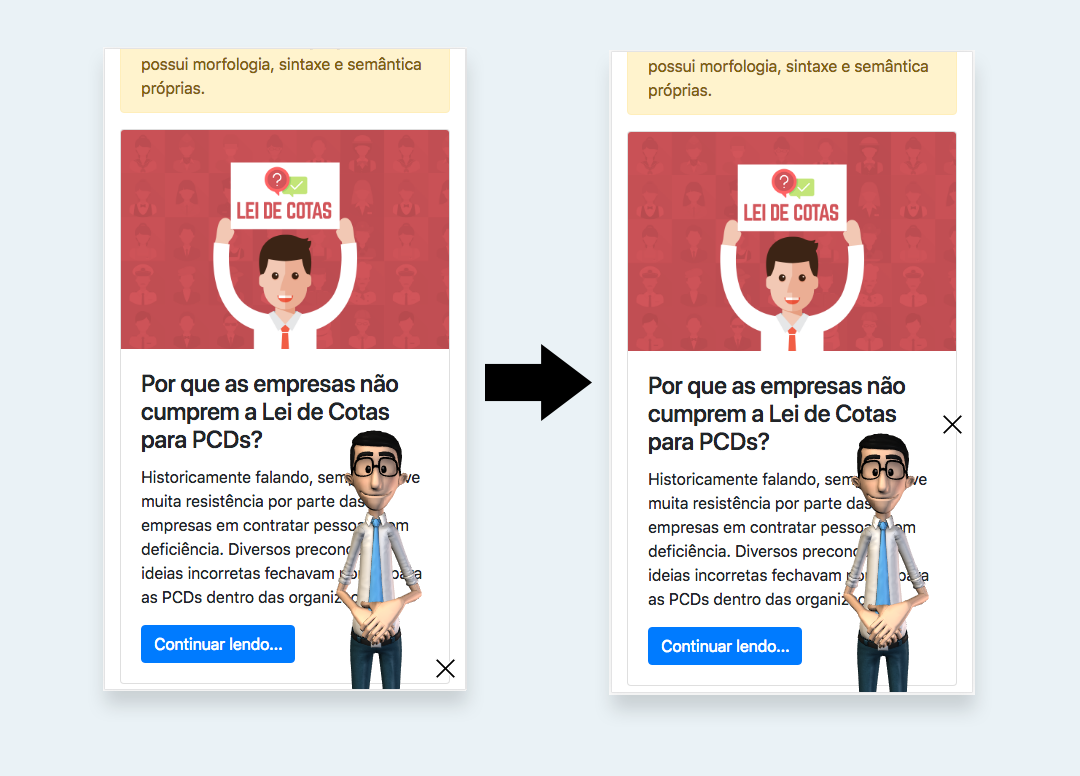
The action buttons include the Close button and the Loading spin. You can use the parameter actionsAling to align the action buttons in the mobile version.
When calling HT, in the parameter mobileConfig, define the actionsAlign as well. Check the quoted examples.
The definition of actionsAlign allows the values:
| Configurations | Description | Values | Default |
|---|---|---|---|
| actionsAlign | Alignment of the action buttons | 'bottom' or 'top' | 'bottom' |
Example of the alignments of the action buttons in the mobile version
Javascript
var ht = new HT({
  // Change it to your access token
  token: 'TOKEN',
  // Defines a specific configuration to the mobile version
  mobileConfig: {
    // Align the action buttons to the top
    actionsAlign: 'top'
  }
});
HTML
<body>
  <!-- Takes the version 4 of the Hand Talk Plugin. -->
  <script src="https://plugin.handtalk.me/web/4.5.1/handtalk.min.js"></script>
  <script>
  var ht = new HT({
    // Change it to your access token
    token: "TOKEN",
    // Defines a specific configuration to the mobile version
    mobileConfig: {
      // Align the action buttons to the top
      actionsAlign: 'top'
    }
  });
  </script>
</body>